Shout for Latest

Menu
  • Home
  • iOS World
  • Android World
  • Mobile World
  • Home World
  • About Us
    • Contact Us
    • Disclaimer
    • Privacy Policy
  • Home
  • iOS World
  • Android World
  • Mobile World
  • Home World
  • About Us
    • Contact Us
    • Disclaimer
    • Privacy Policy
Home
Android World
How to Hide Friends on Facebook App

How to Hide Friends on Facebook App

by Mohan/ July 23, 2017/ Android World, iOS World/ No Comments/
Share
0 Shares

After creation of account, by default all your privacy settings came with public. That means every one can see your profile and find your details. If you want to hide your data, you have to change your privacy settings. Here I am giving step by step procedure for how to hide friends on Facebook app. This can hide your friends list from public visibility, only you can able to see your friends list from your profile page.

Step:1 

Open Facebook app and then go to settings –> Account Settings.

hide friends on Facebook

Account Settings

Step:2

Then navigate to Privacy Settings and then click for options.
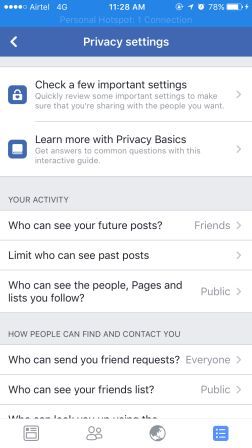
Privacy Settings

You may like Best Music Downloading Apps for Android. 

Step:3

Navigate for “Who can see your friends lists?”, then select “Only me”. From this only you can see your friends list and it will hide friends on Facebook.
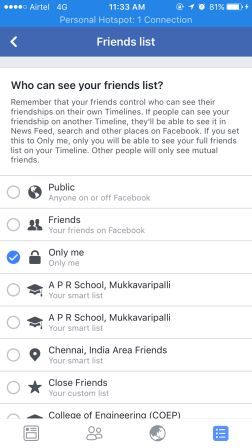
Friends list


About The Author

Mohan

Related Posts

Best Music Downloading Apps

5 Best Music Downloading Apps for Android Mobile

by Mohan/

iPhone 8 Latest Rumors: Expected Specs and Features

by Mohan/

How to Force Restart iPhone or iPad

by Mohan/
Super Mario Run

Super Mario Run Mobile Game Download

by Mohan/

Recent Posts

  • Caution: Facebook Monitoring All Your Activity with Off-Facebook Activity Even Bank Data Too- How to Turnoff It
  • iPhone SE (2020) Review: Amazing Budget Phone
  • iPhone 11, Pro and Max Specifications and Final Verdict
  • What is 5G? What Are All The Benefits of 5G?
  • How to create your own customized stickers for WhatsApp

About This Site

With a passion ShoutforLatest brings the latest technology and trend updates for your mobiles, laptops and even for your home appliances.

Reach Us

admin@shoutforlatest.com https://www.facebook.com/shoutforlatest

About Us

  • Disclaimer
  • Privacy Policy
Shout for Latest Copyright © 2026.
sitemap